welcome to SHADERLAND
You've found your way to the devlog for Shaderland! Delightful. We're glad to have you.
Shaderland's popped up here and there, at demoparties and hacker camps and now a demo on Steam. But at this point, 15 months into this mad project, it's about time I had a real writeup, isn't it?
So what is Shaderland?
shaderland
Shaderland is a puzzle-programming game about computer graphics!
It's a game where you create shaders using a node editor, which define a pattern of pixels. Then, a little autonomous creature, such as Swizzle the ferret, walks on those pixels.
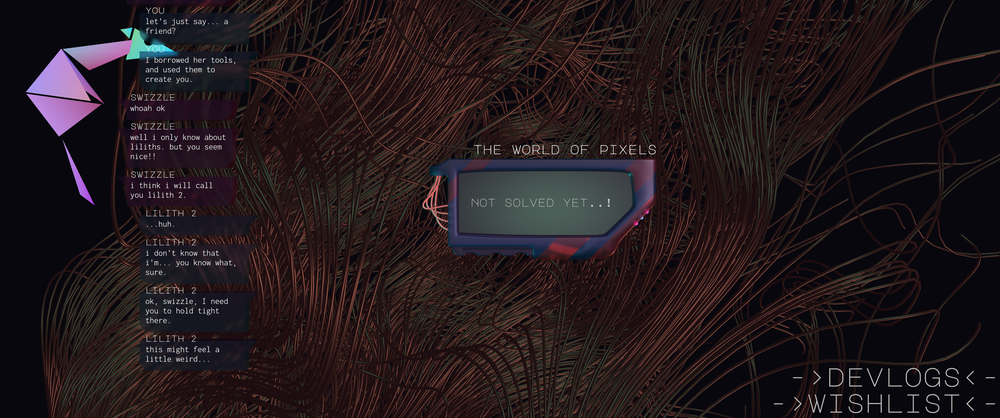
By shaping the world with your shader, you can hopefully guide her to the goals... and get one step closer to finding out why L1l1th built this strange world, and what happened to her.
That sounds complicated, so let's expand a little bit: here are the ingredients that make up a Shaderland...
shaders
If it's a game about shaders, what is a shader? The short definition is something like this:
A shader is a little program which runs in parallel inside your GPU.
Computer graphics, in the present day, involves orchestrating a dance of millions of shader invocations to place vertices, colour pixels, and all kinds of other stuff.
But maybe that doesn't paint the whole picture, and 'all of graphics' is too vague, so let's have a look at what shaders can do.
If you're into game modding, you probably think of shaders as a way to add post-processing effects to your games, kind of like a filter. But that's just scratching the surface.
In the computer art subculture known as the Demoscene, people practice a peculiar art called shader livecoding. For 25 or 60 minutes, a DJ spins some music while participants write a shader to create some kind of (hopefully!) amazing effect.
When I first encountered this at the Revision demoparty in 2025, I thought it was just about the coolest thing ever. For the next year I joined the shader jams at FieldFX to get the hang of this esoteric art. The next year I made it up on stage (that's me in the first round!).
These are 'fullscreen fragment shaders', also seen on websites like Shadertoy. The code here runs on every single pixel of an image, deciding for each one what colour it should be.
Such a shader might run hundreds of millions of times every second. Within that, you can use all sorts of clever tricks: raymarching, fractal flames, cellular automata, physarum, quadtrees...
However, this is just one type of shader. In fact, nearly every stage of computer graphics involves shaders doing some stuff. Vertex shaders calculate where triangles go on the screen. Compute shaders are used to create complex simulations. And that's before we get into the other, more esoteric kinds of shader used for tesselation, raytracing, and other such things. These include such nefarious characters as closest hit shaders, mesh shaders, and many others...
Shaders are an incredibly powerful tool. The story of the last decade of programming is in large part the story of getting to grips with the massively parallel power of a GPU. But notoriously, they are also quite hard to learn.
This is where Shaderland hopes to help. Because shaders don't have to be complicated. The point of Shaderland is to make them into something you can play with.
Bit by bit, we build up the concepts you will need to understand what shaders are doing. When you finish the game, the hope is that other tools—Blender, Unity, Unreal, Tixl, or indeed writing directly in languages like GLSL or HLSL—will be much easier for you to understand!
automata
Unlike most games, you do not directly control the creature in Shaderland. It walks on its own, reading the pixels created by your shader and deciding which way to walk. All the animations are calculated based on this automaton.
There aren't a lot of games which take this idea. The best-known is probably the Lemmings series, created by DMA Design in 1991, which makes it about as old as I am. More recently there is Line Rider, somewhere between a toy and an art tool, which still supports a passionate artistic subculture creating beautiful, music-synced tracks.
Much like the lemmings, Swizzle is an automaton that looks at a small group of pixels and decides how to walk based on that. My immediate inspiration for the automaton's design was actually the wonderful videos of Lu Wilson aka TodePond, who has made some absolutely delightful videos about interactive cellular automata. Particularly cool is the their Sandpond Saga series, which showed how simple, pattern-based rules could lead to all kinds of behaviour.
puzzle programming
I've been playing Zachtronics games since Spacechem. It's long been a dream to make a game of that type. Since then, the puzzle-programming genre has seen a lot of wonderful games, such as Opus Magnum, Exapunks, TIS-100, Shenzhen I/O, Turing Complete, Human Resource Machine, and Replicube...
It turns out the infinite richness of programming can be constrained enough to make an interesting game! In particular, it's fun to optimise and compete with other players. Programming gives you a large set of 'moves' to make; the puzzle is to figure out how to compose them to create a desired result.
So the initial seed of Shaderland, which arrived in a sudden flash during a trip to Belgrade, is this: a Zachlike game about shaders, where you guide a cellular automaton. The whole concept was pretty much realised then and there... but of course a concept is just a concept, and you still gotta implement that!
the creation of shaderland
Shaderland is a solo-dev project, with the exception of music and sound created by my brilliant friend Yuri Heart.
To be clear this is actually my job! My colleagues at Holonautic have been really cool about giving space to spend a year focusing all my time on this weird passion project while they developed Rail Estate, and lots of helpful advice and testing along the way. But I wrote all (at time of writing) 21,728 lines of code in this game. (By hand, no AI thank you.)
It's all written in the Rust programming language, plus some WGSL for the shaders.
I decided early on not to use a game engine. This is an unusual choice, and it did add some extra work creating things that a game engine would give you, but for this specific game, a game which is all about doing weird stuff with rendering APIs, it made sense.
No engine doesn't mean no libraries of course. Rust has a lot of very good projects which helped make Shaderland possible, some of the most important being WGPU for abstracting over different graphics APIs (with its Naga compiler being particularly essential), the Iced UI library as the scaffolding the game is built around, Kira for audio, and petgraph for representing the Directed Acyclic Graphs that back up the node graphs in the game.
nodes
Traditionally, you define a program by writing a text file. But in the last decade or so, certain tools (for example, Blender, Graphite, Tixl, Notch, Cables, Septabee, Houdini, Unity and Unreal) brought in an alternative view of computation, the node editor.
Instead of writing source code in text form, you connect up nodes representing functions visually in a graph. Under the hood, this builds a DAG which can be compiled into a program. In that regard, it's the same as a regular compiler, and only the frontend is different.
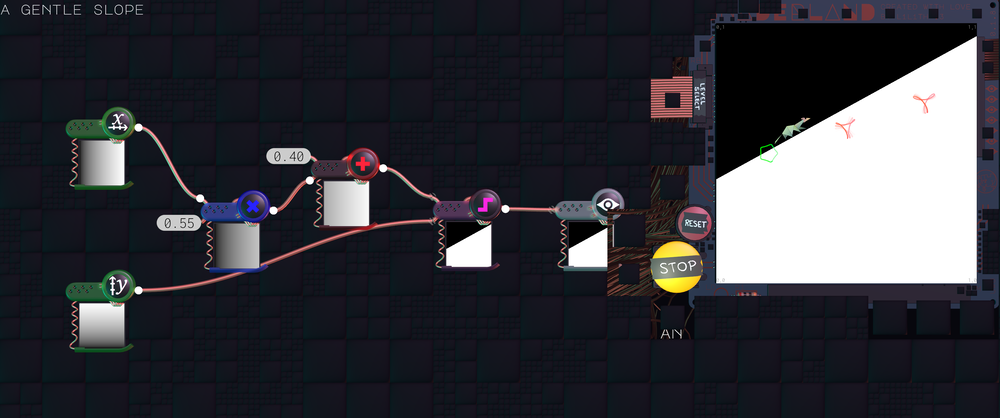
Node editors have some advantages and some disadvantages. They can get painfully unwieldy. But they're a great starting point: easy to play around with, and they won't stop you dead in your tracks with a confusing syntax error. Most of all, they give you a very immediate, visceral sense of the shape of your program.
The very first prototype of Shaderland had the player writing WGSL code directly. It proved the concept could work but, honestly, this was a game for people who already knew graphics programming.
So Shaderland needed a node editor, like the ones in Blender and Unity. This was also a huge help to puzzle design, because I could much more easily restrict the tools available to the player: only certain functions, only certain numbers of those functions.
There was no existing one that did exactly what I wanted, though, so I made my own. More on that in a future devlog =)
a learning fractal
At the time I started making Shaderland, I was still a beginner at Rust graphics programming. I had written a simple 2D raytracer many years earlier, but now the tools I was using were pretty advanced ones, with tricky corners for the unwary. Or, as the dire warning on the Iced documentation puts it...
The library leverages Rust to its full extent: ownership, borrowing, lifetimes, futures, streams, first-class functions, trait bounds, closures, and more. This documentation is not meant to teach you any of these. Far from it, it will assume you have mastered all of them.
Well, I like a challenge. And I think it paid off pretty well: all of those things feel like second nature at this point. (At a certain point, functional languages like Haskell also became a lot more straightforward.)
I'm a much better Rust programmer now than I was when I started. And this reflects something important about this project: the means I'm using to make this game (learning graphics programming) are the same as the ends of the game itself (making graphics programming easier to learn).
Over the course of this devlog, I'll get into some of the challenges of that latter part. Because it's taken quite a bit of iteration to get the game comprehensible.
In a puzzle programming game, you are dealing with the infinite world of recursively enumerable language. Each puzzle is a huge, wide-open space which a player can very easily get lost in. So finding the right balance, teaching the concepts while keeping enough Zachtronics-style open-endedness to be interesting, has been tricky.
Learning programming is akin to learning a natural language. We want the student to not just understand what expressions mean, but have the confidence to say new things, things we didn't teach them.
Can Shaderland achieve that? I hope so...
making the visuals
I think that a game that teaches you about graphics programming has to look pretty. How can you believe I know what I'm talking about if I don't show off a bit? ;)
The look and feel of Shaderland evolved gradually. I knew I wanted it to feel tactile, and call to mind technology aesthetics of the late 90s and early 2000s—the era of skeuomorphic design and transparent plastic. A big win came when I figured out a way to render that 'old Game Boy look' efficiently using a dual Kawase blur effect.
Wires are also another major theme of the game. To interact with computational space is a way of touching infinity. I was heavily inspired by the power lines in Serial Experiments Lain, the nest of wires seen at the beginning of Elephants Dream (an early Blender short film that was very formative on me in my teens), and the megastructures seen in the works of Tsutomu Nihei such as Blame!.
I won't go into all the details of how wires are rendered, although it is building on the divergence-free field rendering effect I wrote in December 2025. The quadtree effect seen in the node editor builds on the work of demosceners like Flopine and NuSan. And there will be lots of other cool effects to see as the game develops =)
animating swizzle
In early versions of Shaderland, before the story started to develop, the character was just a little triangle person. This is the version seen at the Evoke demoparty in 2025...
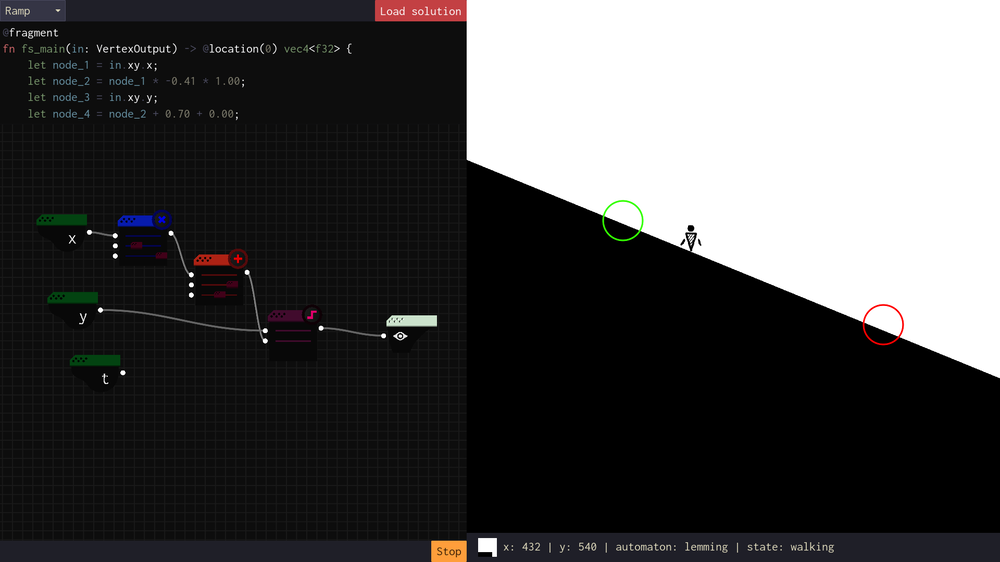
Of course, that wouldn't do. Yuri was the one to suggest that the character could be a ferret, and suggest the default name Swizzle. I loved this, and so I made a model of Swizzle in Blender. Just a handful of triangles with an origami look (nearly all of Swizzle's triangles are in her eyes).
To animate Swizzle, everything needed to follow procedurally from the cellular automaton. Swizzle is actually controlled by only six bones: four for the feet, and two for the head and tail. By careful weight painting, the rest of Swizzle's body follows naturally from the placement of the feet. I take the series of points that the automaton walks along and keep track of which foot is grounded, which makes it possible to calculate the rest of these bones entirely procedurally.
I am very, very happy how much people seem to be enjoying meeting Swizzle. It's been quite fascinating seeing what animals people interpret Swizzle as: to some Swizzle is a rat, to others, a dog, and who knows what else? Ultimately, Swizzle is a Swizzle, and her exact animal identity is open to interpretation. After all, you created her...
the story
At the moment I'm just starting to tease the story, the details are still cooking. But to spare a few words here...
The strange worlds of Shaderland were created by L1l1th. You are someone who loved her, even if you didn't understand. And now she's gone. Where? What happened to her? What did she become?
It seems she left a trail, a path to try to understand her... by following in her footsteps and building in your mind the worlds she had in hers. Or is that just wishful thinking?
This is not a game about suicide. It is a game about life and the weird forms that it takes. But, it is certainly informed by loss. Earlier this year, during the development of the game, a friend in the hacker scene died by suicide. Nora was not the first friend I've lost that way, either; I hold on to the memories of Fall who died some years before.
Nora left various pieces of code and unfinished projects; a whole world that is now opaque and it will not get the chance to explain. And there are many such worlds. Every person carries inside them a unique model of their environment, and the power to create new worlds through language and the mysterious workings of brains.
Shaderland is a story about those secret worlds. As Ryuukishi07 wrote, without love, it cannot be seen.
Graphics programming, especially, is an art of conjuring. L1l1th is an occultist as well as a hacker, and as you get to know her and her menagerie of weird creatures over the course of this game, perhaps you'll get to understand her worldview...
the Revision 2026 demo
In April 2026, I presented a demoscene demo based on Shaderland at the Revision demoparty in Saarbrücken, called Shaderland: Swizzle's Journey. A 'demo' in this sense is essentially a program which creates a music video, by rendering an animation in realtime.
This required building an animation system on top of the game, allowing me to scrub the timeline and record events such as the creation and connection of nodes. Whenever the node graph changes, the shader changes underneath. The simulation of the ferrets is carried out beginning to end when the demo first opens, and re-run from the beginning whenever I change something.
The animation system is a little too jank to make accessible in the game at the moment, but I hope it shows some of the potential of this game for live performance and use as an art tool!
what comes after the demo?
A few months later came the actual game demo (it is confusing how this subculture overloads the word emo!). First seen at the EMF hacker camp and then, in more developed form, at Evoke 2026 and the Fantoche festival... and now at last it's on Steam!
Making the demo involved building most of the systems the full game will need. The fancy UI, the compiler and automaton at the heart of it, all the systems for loading level definitions. But where is it going?
There will be quite a lot more ferret puzzles, for one. We're only just getting started in terms of the nodes and ways to combine them. The last level of the demo, where you figure out how to draw an arbitrary diagonal line, used to be the first level. With time, multiple swizzles, and various other constraints there will be plenty to explore in this first part.
But Swizzle is not the only automaton you will meet. There is a turtle, who responds to colours; an armadillo, who possesses momentum and lives in a world of Signed Distance Fields, and stranger residents of Shaderland besides as we get closer to the third dimension.
Likewise, I would be highly remiss as a teacher of graphics if I stopped only at fullscreen fragment shaders. As neat and self-contained as they are, real graphics programming involves vertex shaders and many other types besides. You will learn how to control a triangle, and perhaps even create your own Swizzle.
Also planned is the ability for players to create their own puzzles to challenge each other. For all the complex machinery in the game, a level is just allowed nodes and some goals. I would love to see what people can cook up.
The game is planned to go into Early Access towards the end of the year. All feedback is extremely welcome: you can contact me on Fedi, Bluesky, Tumblr, the Steam forum for the game, or email. In the meantime, I'll keep this site updated to give you a sense for what's going on.
demo feedback
The demo's been out on Steam for a few days now, and I'm extremely grateful for all the interest and feedback it's received already!
Here are some known issues from the playtesting:
- on computers without a middle mouse button (e.g. laptops), it is impossible to navigate the level select screen
- two-finger trackpad scrolling does not work on some laptops
- the scene scales inappropriately with UI scaling, causing the editor to be squashed and tutorial text to overlap on some screens
- it is not obvious how to access settings from the launch screen
- switching monitors should be easier
- adjusting numeric values is fiddly, and may be unintuitive
- one Windows user reported the game did not launch
The next demo update should address most of these issues!